
Video Hosting for Courses: The Best Path for Creators
Discover the best video hosting solutions for your courses. Simplify your teaching with all-in-one platforms like Hopper, ensuring smooth playback and...
By the Hopper team

If you're choosing video hosting for courses, an all-in-one platform like Hopper is the simplest, safest default for most educators. It bundles secure video delivery with community, storefront, and course tools, so you're not stitching together three logins to run one business. The math is simple: fewer subscriptions, predictable monthly costs, and embeds that just work. A standalone video host still makes sense if you run a large institutional catalog, need custom DRM, or have compliance needs that outgrow a typical course platform.
Key Takeaways
An all-in-one platform with built-in secure video delivery, like Hopper, gives most course creators lower cost and less operational risk than stitching together separate hosting, community, and sales tools.
| Point | Details |
|---|---|
| Prioritize predictable pricing | Choose flat storage tiers over per-minute or per-viewer billing to avoid surprise costs during launches. |
| Secure embeds are non-negotiable | Use domain whitelisting, AES encryption, and expiring links to protect paid video content. |
| Accessibility drives completion | Accurate captions and transcripts help more students finish courses, not just meet compliance. |
| Migrate with a sandbox test | Audit, re-encode, batch upload, then test playback before cutting students over to a new host. |
| Hopper consolidates the stack | Hopper combines course hosting, community, and a storefront in one platform, cutting tool overlap and centralizing student data. |
Table of Contents
- What Features Matter Most for Course Video Hosting?
- How Much Does Video Hosting for Courses Cost?
- How Do You Embed Course Videos and Connect Your Tools?
- How Do You Keep Paid Course Videos Secure?
- What Accessibility Features Should Course Videos Include?
- How Do You Migrate and Scale a Course Video Library?
- Why Hopper Works as an All-in-One Video Hosting Option
- When Should You Choose an All-in-One Platform vs. a Standalone Host?
- Try Hopper for Your Course Video Hosting Needs
- Recommended Reading
- Frequently Asked Questions
- Sources
What Features Matter Most for Course Video Hosting?
Every serious course platform needs the same table stakes. Skip any of these, and you'll feel it the moment your course launches.
- Adaptive streaming so students on spotty Wi-Fi still get smooth playback instead of endless buffering.
- Captions and transcripts for accessibility and for students who watch muted on the train.
- Per-student analytics that show completion rates, drop-off points, and which lessons get replayed.
- Domain-locked embeds so your paid video only plays on your course pages, not a stranger's blog.
- Watermarking or DRM options to discourage screen recording and resale of your content.
- A white-label player that looks like your brand, not a third-party logo bolted onto your lesson.
An editorial roundup on video hosting for online courses points to playback smoothness, analytics depth, and content protection as the features that separate a course host from a glorified file dump. Miss the analytics piece, and you're flying blind on which lessons students actually finish.
Pro Tip: The feature creators underestimate most is pricing structure, not video quality. A platform with flat storage tiers protects you from a surprise bill the week your course goes viral. Per-minute or per-viewer billing looks cheap in month one and painful in month three.
How Much Does Video Hosting for Courses Cost?
Pricing for course video hosting generally falls into four models: flat storage tiers, per-gigabyte storage, per-minute viewing charges, and per-viewer fees. Each has a different risk profile once your audience grows.
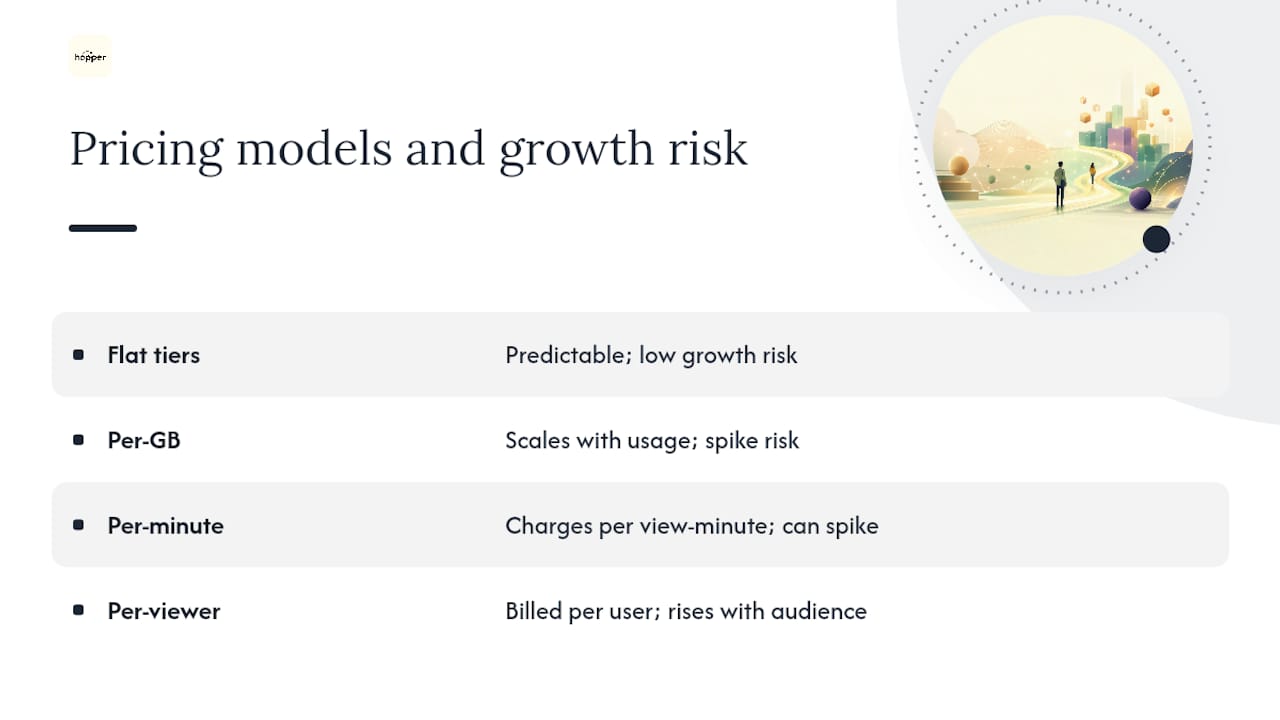
Flat tiers bundle a set amount of storage and bandwidth into one predictable monthly rate. Per-GB and per-minute models scale with usage, which sounds fair until a launch email sends 2,000 people to a lesson in one afternoon.
To estimate your real monthly need, multiply your total video hours by the storage size per hour, then factor in expected monthly views. A course library encoded at roughly 1GB per hour of HD video needs a proportionate amount of storage before you even count repeat views and downloads.
Practitioners who build course infrastructure generally advise against bandwidth-metered billing, since a single viral launch can turn a $30 plan into a four-figure surprise. Vendors like DynTube and Skippz both lean into flat or unmetered plans for exactly this reason, bundling storage and bandwidth so a good launch week doesn't punish you financially.
How Do You Embed Course Videos and Connect Your Tools?
Most course hosts offer three embed options: iframe, JavaScript player embed, and oEmbed. Iframe embeds tend to work best across learning management systems because they isolate the player from your page's code, avoiding style conflicts and script errors.
Before you pick a host, run through this integration checklist:
- LMS compatibility with platforms like Teachable, Thinkific, LearnDash, or a WordPress-based course site.
- Single sign-on or user ID passing so your analytics tie viewing behavior to actual students, not anonymous traffic.
- Payment gateway connections, or better, a built-in storefront that skips the extra integration entirely.
Once you've chosen a host, the setup follows a short, testable sequence:
- Upload your video and let it finish processing at your target resolution.
- Configure the domain whitelist to lock playback to your course site.
- Copy the embed code into your lesson page.
- Test playback in a sandbox or unlisted course page before publishing.
- Confirm analytics are logging views correctly before you announce the launch.
How Do You Keep Paid Course Videos Secure?
Piracy protection and student privacy both come down to a handful of practical controls, not exotic technology.
- AES encryption scrambles your video file so it can't be pulled and reuploaded elsewhere.
- Signed tokens and expiring links stop someone from sharing a raw video URL in a group chat.
- Domain whitelisting blocks playback outside your course pages entirely.
- Per-student watermarking or a screen shield discourages screen recording by making leaked footage traceable.
- Optional DRM adds another layer for creators selling premium enterprise-grade cohorts.
Watch for red flags: any host relying on password protection alone, or storing video unencrypted, is a weak foundation for paid content. Also be wary of vendors that expose student emails inside shared analytics dashboards without clear consent. On the privacy side, pass only the minimal identifiers you need for analytics, and document how student data gets used. That's not just good practice. It's what keeps students trusting you with their information.
What Accessibility Features Should Course Videos Include?
Accessible video isn't optional polish. It's what lets a student with hearing loss, a non-native English speaker, or someone watching on a train with the sound off actually finish your lesson.
- Accurate captions, not auto-generated garbage left unreviewed.
- Downloadable transcripts for students who prefer reading or need to search back through content.
- A keyboard-navigable player so students who can't use a mouse can still play, pause, and scrub.
- Sufficient color contrast in the player controls for low-vision students.
Most hosts let you upload an SRT caption file directly, or auto-generate captions and then have a human review them for accuracy, which matters more than people expect once technical vocabulary enters the picture. Multi-language caption tracks matter too if you're teaching a global audience.
Pro Tip: Don't let transcripts sit idle. Repurpose them into lesson summaries or blog posts. You get free SEO content and better lesson notes for students, from work you already paid for.

How Do You Migrate and Scale a Course Video Library?
Moving an existing video library to a new host is mechanical work, but skipping a step here costs you weeks later.
- Audit your existing library and note resolution, format, and total hours.
- Choose your target encoding and resolution before you start uploading.
- Batch upload using a chunked API or bulk upload tool rather than one file at a time.
- Set domain whitelists and run playback tests on every lesson type, not just one sample.
- Cut over in a sandbox course before pointing your live students at the new host.
Once migrated, scaling comes down to using a CDN for global delivery, choosing a plan with generous or unmetered bandwidth, and keeping backups of your original files separate from the host. One creator consolidating three tools into a single course platform reported cutting nearly $6,000 a year in overlapping subscriptions, simply by retiring the extra video host, community tool, and storefront plugin he no longer needed.
Why Hopper Works as an All-in-One Video Hosting Option
Running a course business across four different logins is its own kind of tax: on your time, your budget, and your sanity. Hopper folds course creation, video delivery, a community hub, and a built-in storefront into one place, so you're not paying for a video host, a community app, and a link-in-bio tool separately.
- Course creation and video delivery live in the same dashboard as your community and sales pages.
- A native mobile app for iOS and Android means students engage with your content without a browser workaround.
- The built-in storefront replaces tools like Stan Store or Linktree, so product sales don't need a fourth subscription.
- Asynchronous coaching features let you support students without scheduling live calls for every question.
Consolidating course tools into one platform doesn't just cut cost. It centralizes student data so you can actually see who's engaged, who's stalling, and who's ready for your next offer, instead of piecing that picture together across four dashboards.
If you're evaluating what switching actually looks like, Hopper's comparison of tool sprawl versus one platform walks through the real costs creators often miss.
When Should You Choose an All-in-One Platform vs. a Standalone Host?
Most creators should default to an all-in-one platform. It's simpler, cheaper, and keeps your student data in one place instead of scattered across disconnected tools.

The exception is real but narrow: pick a standalone video host only if you're managing an enterprise-scale catalog, need custom CDN control, or face an unusual compliance requirement your course platform doesn't support. Outside those cases, the consolidation wins.
Try Hopper for Your Course Video Hosting Needs
Hopper gives you one predictable monthly bill instead of separate charges for video hosting, community software, and a storefront tool. That's the concrete difference: no juggling renewal dates across three vendors, no recalculating your margins every time one of them raises prices.

During a trial, you get the full picture: course creation with secure, embeddable video, a branded community space, and a built-in storefront that replaces separate checkout tools. Migration support is available if you're moving existing video and payment history over, so switching doesn't mean starting from zero. If consolidating your course stack sounds like the relief it is, start a Hopper trial and see what one dashboard for video, community, and sales actually feels like.
Recommended Reading
- Hopper's blog for migration workflows and platform comparisons.
Frequently Asked Questions
Is video hosting for courses different from regular video hosting like YouTube? Yes. Course video hosting adds domain-locked embeds, analytics tied to individual students, and encryption to protect content you're selling, none of which a public video platform is built to provide.
Do I need a separate video host if I already use a course platform? Not usually. Most course creators only need a standalone video host if their platform lacks secure embeds or analytics, which is increasingly rare with modern all-in-one tools.
What's a realistic monthly cost for video hosting for courses? It depends on your library size and viewer volume, but flat-tier plans that bundle storage and bandwidth tend to be more predictable than per-minute or per-viewer billing, especially during a launch week.
Can I migrate my existing videos without losing quality? Yes, as long as you audit your original files, choose a matching or better target resolution, and test playback in a sandbox course before your students see the new host live.
Sources
- Best Video Hosting Solutions for Online Courses — Liquid Web
Recommended
On our list and want off? .