
What Does Circle Cost? A 2026 Price Breakdown
Discover the real costs of using Circle in 2026. From pricing tiers to hidden fees, get the full breakdown and plan your budget effectively.
By the Hopper team

Circle's headline price starts at $89 a month for Professional, $199 for Business, and Circle Plus runs custom pricing for larger operations. That number is the beginning of the conversation, not the end of it.
- Transaction fees stack on top: 2% on Professional, 1% on Business, and a lower custom rate on Plus, all riding above Stripe's own processing cut.
- Email Hub, branded apps, and migration services add further line items once your community grows past the free tiers included.
- Circle offers a free 14-day trial, and its public prices are annual-billing equivalents. Pay month to month and the in-app rate runs higher.
Key Takeaways
Circle's real monthly cost depends less on the plan you pick and more on your payment volume, contact growth, and how many fees stack on top of the base subscription.
| Point | Details |
|---|---|
| Headline price isn't the full price | Professional starts at $89/month, but platform fees and Email Hub add real cost on top. |
| Fees scale with success | Circle's 2%/1% platform fee stacks on Stripe processing, cutting into revenue as you grow. |
| $11,000/month is the Business breakpoint | Past that payment volume, Business's 1% fee savings outweighs its higher subscription cost. |
| Upgrade triggers are operational | Live attendee caps and admin seat limits push tiers up faster than member count alone. |
| Hopper offers flat-rate pricing | Base is $58/month with a 1% fee, Pro is $108/month with 0% fees, replacing Circle's stacked-fee model. |
Table of Contents
- How Much Is Circle: The Full Price Breakdown
- What Do You Actually Get on Each Circle Plan?
- What Hidden Fees Should You Budget For?
- Which Circle Plan Fits Your Community?
- Circle vs. Hopper: Which Costs Less?
- How to Evaluate Circle's Real Cost for Your Business
- Why the Sticker Price Rarely Tells the Whole Story
- A Flat-Rate Alternative Worth Testing
- Where to Verify These Numbers and Read More
- Sources
- FAQ
How Much Is Circle: The Full Price Breakdown
Circle's public pricing page displays annual-equivalent monthly rates, which is where a lot of the confusion starts. Professional lists at $89 a month, but that figure assumes you pay $1,068 upfront for the year. Business follows the same pattern at $199 a month, or $2,388 billed annually. Circle Plus skips public pricing entirely and moves to a sales conversation, typically for organizations that need white-label controls or custom limits.
Here's the plan lineup at a glance:
| Plan | Monthly-equivalent price (annual billing) | Notes |
|---|---|---|
| Professional | $89/month | Entry tier for solo creators; 2% platform fee |
| Business | $199/month | 1% platform fee, adds automation and API access |
| Circle Plus | Custom | Sales-led; lowest fee tier, white-label options |
A few things worth flagging before you commit:
- Monthly billing without annual commitment typically costs more per month than the annual-equivalent pricing.
- Circle doesn't cap total members on any tier, but admin and moderator seat counts, storage, and live-attendee limits all scale up as you move from Professional to Business to Plus.
- The 14-day trial period allows evaluation before committing, important because of additional add-on costs beyond the base price.
What Do You Actually Get on Each Circle Plan?
Professional covers the essentials: unlimited members, courses, and community spaces, plus basic moderation tools. What it doesn't include is where the upgrade pressure starts. Workflows and automation, API access, and custom profile fields sit behind Business.
Circle Plus includes advanced features such as white-label branding, increased limits, dedicated support, and availability of branded mobile apps as part of the offering.
Storage, live-attendee concurrency, and admin seat counts all expand as you move up. A ten-person team running weekly live sessions for a few hundred members will hit Professional's limits faster than a solo coach running monthly office hours for fifty people. That's the practical difference: it's not just about member count, it's about how much simultaneous activity your community generates.
Common features locked by tier:
- Workflows and automation: Business and above.
- API access and custom profile fields: Business and above.
- White-label branding and branded apps: Plus (or as a paid add-on elsewhere).
- Lower platform fee (1% vs 2%): Business and above.
Pro Tip: Watch for the moment you start running live sessions with more concurrent attendees than your current tier allows, or when you need a second or third admin seat. Those two triggers push more creators into Business than revenue growth alone does.
What Hidden Fees Should You Budget For?
The platform fee is the one most creators underestimate. On a $50 monthly membership charge, you're losing roughly $1 to Circle and another $1.75 or so to Stripe, before any refunds or disputes.
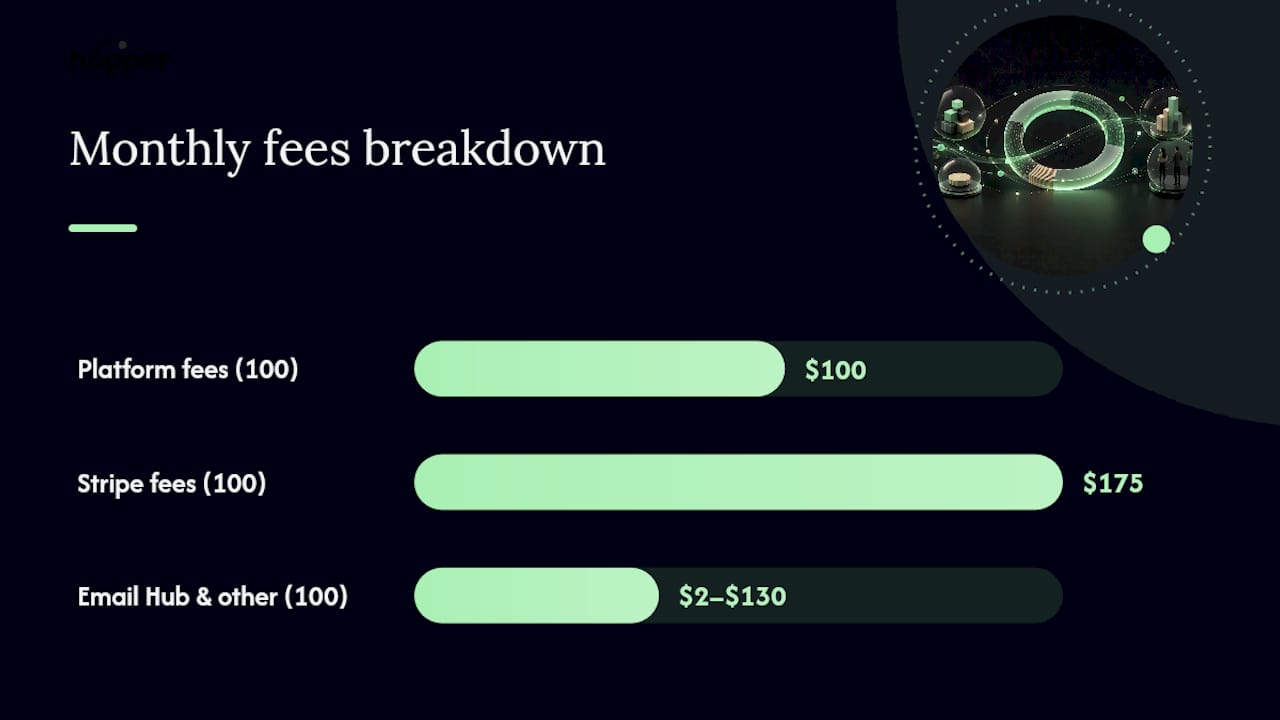
Run that math across a real community and the totals add up fast. One breakdown shows a 100 member paid community reaching $277 to $405 a month once platform fees, Stripe processing, and Email Hub charges are layered onto the base subscription.
Line items to plan for beyond the base plan:
- Platform/transaction fee: 2% (Professional), 1% (Business), lower custom rate (Plus).
- Email Hub pricing depends on contact volume and increases as your list grows.
- Branded apps, migration support, and concierge onboarding are generally available as Plus-tier features or require custom quotes.
- Additional charges may apply when exceeding storage or live-session limits per tier.
If that number beats the extra $110 a month Business costs, the upgrade pays for itself.*
Which Circle Plan Fits Your Community?
A solo creator launching a first paid group with under $5,000 in monthly membership revenue usually does fine on Professional.
Course-plus-community operators running cohort programs alongside ongoing membership tend to outgrow Professional's automation limits quickly. Anyone managing onboarding sequences, drip content, or multi-step workflows benefits from Business's automation tools regardless of fee math.
Scaling memberships with steady recurring revenue are where the Business upgrade earns its keep on fees alone, not just features. Once monthly payment volume climbs past roughly $11,000, the 1% fee savings outweighs the higher subscription cost of Business over Professional.
Agencies and enterprise brands that need white-label control, custom limits, or a branded mobile app land on Circle Plus by default, since those features simply aren't available lower down the stack.
- Solo creator, early paid group: Professional.
- Course + community, active automation needs: Business.
- Growing membership past $11,000/month in payments: Business.
- Agency or enterprise needing white-label and branded apps: Circle Plus.
Circle vs. Hopper: Which Costs Less?
Circle's pricing model stacks a base subscription, a platform fee, and Email Hub charges that all move independently as your community scales. Hopper takes a different approach: one flat monthly price with two tiers and no separate contact-tier billing.
Hopper tends to come out cheaper for a specific type of creator: someone running one paid community with steady payment volume who doesn't need a separate course host, link-in-bio tool, or checkout system stitched together.
Circle still makes sense for larger operations that specifically need Circle Plus's white-label and enterprise controls, or teams already deep into Circle's workflow automation and unwilling to rebuild it elsewhere. For everyone stacking a course platform, a community tool, and a checkout page separately, consolidating onto one flat-rate platform tends to change the math more than any single fee comparison does.
How to Evaluate Circle's Real Cost for Your Business
Before you pick a tier, run these numbers:
- Estimate your monthly membership revenue and expected payment volume.
- Count how many admins or moderators you actually need seats for.
- Check whether you run live sessions and estimate peak concurrent attendees.
- Project your Email Hub contact count six months out, not just today.
- Multiply your projected payment volume by the fee difference between tiers to see if Business pays for itself.
If the fee savings on Business beat the extra $110 a month over Professional, upgrade. If not, stay put until revenue grows.
Pro Tip: During your 14-day trial, track your actual payment volume and Email Hub contact growth for a few weeks. Extrapolating those two numbers alone predicts most of your real monthly bill.
Why the Sticker Price Rarely Tells the Whole Story
Most creators compare platforms on the number that's easiest to find, then get surprised three months in when Stripe fees, Email Hub charges, and platform cuts have quietly doubled their bill. The mistake isn't picking the wrong tier. It's treating the headline price as the finish line when it's really the starting line.
The smarter question isn't "what's the monthly price," it's "what's my total cost at my actual payment volume, six months from now." Prioritize simplicity when your revenue is steady and predictable. Prioritize flexibility only when you genuinely need the automation or white-label controls that come with it.
A Flat-Rate Alternative Worth Testing
Circle's fee structure charges you more as your community succeeds, since transaction fees scale with every payment that comes through.

Hopper also folds in the tools creators usually pay for separately: a content library, async coaching, and a built-in storefront, alongside native iOS and Android apps at the flat price. If you're currently paying for Circle plus a checkout tool plus a link-in-bio page, moving everything into one hub often costs less than the sum of those separate subscriptions. Hopper's free migration support rebuilds your existing content and members without asking you to start from scratch, and you can read how other creators approached the switch on the users love page. Start a trial and run your own numbers against your current Circle bill before your next renewal.
Where to Verify These Numbers and Read More
Check Circle's official pricing page for current headline rates, and read the Capterra reviews for user feedback on features and support. For a detailed fee breakdown with worked examples, the Scrile pricing guide and RevenueGeeks' cost analysis both walk through real scenarios. Note that CircleCI, a developer tools company, is an entirely separate product from Circle the community platform. For a broader look at how coaching platforms compare, Hopper's platform comparison post covers Kajabi and Skool alongside Circle.
Sources
- Circle Pricing in 2026: Plans, Costs & Best Alternatives
- Circle.so Pricing: The Fees Nobody Warns You About (2026)
- Circle Pricing 2026: Fees, Plans & Real Cost
- Circle.so - Community Platform & Reviews | Capterra
FAQ
How much does Circle cost?
Circle's Professional plan starts at $89 a month billed annually, Business runs $199 a month billed annually, and Circle Plus uses custom pricing for enterprises.
How much does it cost to use Circle with fees included?
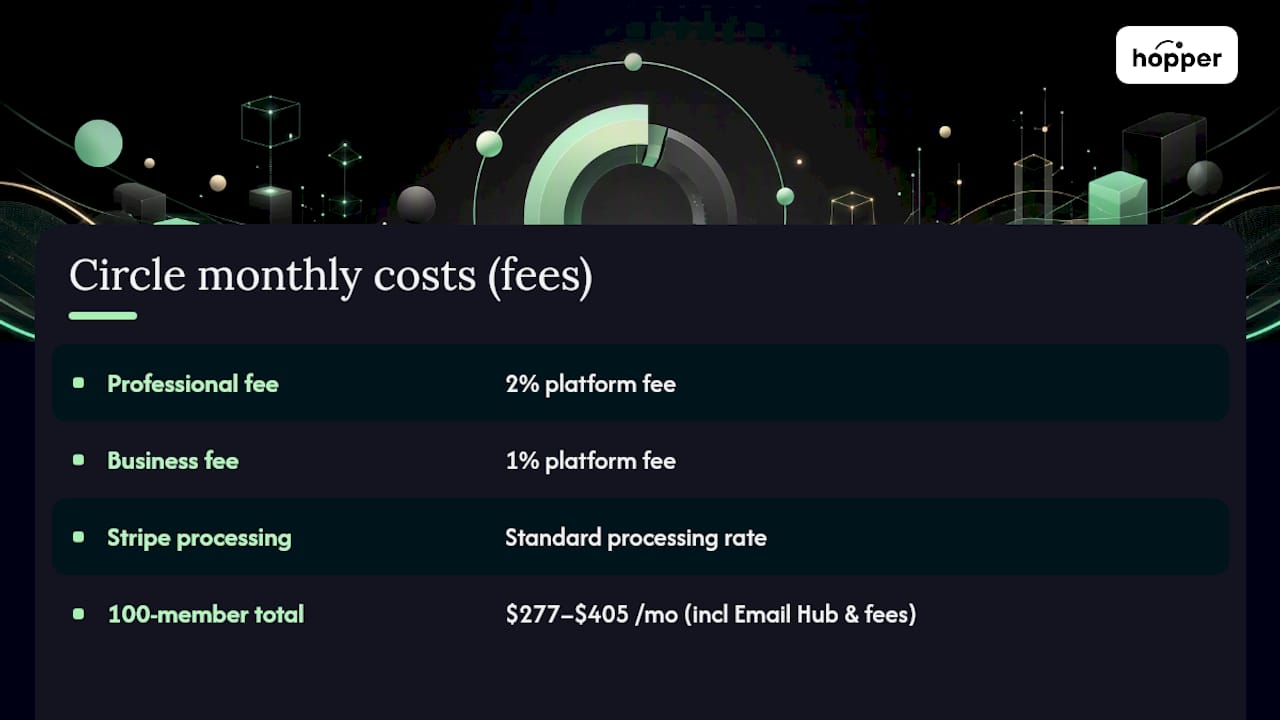
Beyond the base subscription, Circle charges a 2% (Professional) or 1% (Business) platform fee on transactions, plus Stripe's standard processing rate, which can push a 100-member paid community to $277 to $405 a month once Email Hub and fees are included.
Is a Circle membership worth it?
Creators who want a flat monthly rate without fee scaling may find Hopper's $58 or $108 flat-rate tiers a simpler comparison.
Can I use Circle for free?
Circle offers a free 14-day trial rather than a permanent free plan, giving you enough time to test workflows, Email Hub, and payment setup before committing to a paid tier.
Recommended
On our list and want off? .