
Stripe vs PayPal Fees: What Actually Costs You More in 2026
Discover how Stripe and PayPal fees compare in 2026, and learn which payment processor can save you money on your transactions.
By the Hopper team
Stripe is usually cheaper for standard US domestic online card payments. PayPal's standard card rate runs 2.99% + $0.49, and its PayPal Checkout flow (the one most stores actually use, with the recognizable buyer login) climbs to 3.49% + $0.49.
That gap looks small until you run real order volume through it, and it can flip entirely depending on three things: which PayPal product you're actually using, whether you sell internationally, and how often customers ask for refunds or file disputes.
Here's what to check before you decide:
- Which PayPal integration you have: standard card flow, Checkout, or Advanced (each carries a different published rate).
- Whether your buyers pay in a foreign currency, since currency conversion fees stack on top of the base rate for both processors.
- Your refund and chargeback rate, since neither company returns the original processing fee after a refund.
Pro Tip: Pull your last three months of order data and separate it by average order value before you compare rates. A $500 average order behaves completely differently under Stripe vs PayPal fees than a $10 one, and the fixed-fee component is the reason why.
Key Takeaways
| Point | Details |
|---|---|
| Stripe wins on headline rate | 2.9% + $0.30 beats PayPal Checkout's 3.49% + $0.49 on most domestic online sales. |
| Identify your PayPal integration | Standard card, Checkout, and Advanced routes carry different published rates. |
| Currency conversion changes the math | PayPal's conversion fee can run up to roughly 4%, versus Stripe's combined 2.5% international and conversion charge. |
| Refunds don't return processing fees | Both providers keep the original fee even after a full refund, so high-return categories carry hidden cost. |
| Hopper folds fees into one platform | Course creators pay 1% on Base or 0% on Pro instead of stacking separate checkout and billing tools. |
Table of Contents
- How Do Stripe and PayPal Fees Compare at a Glance?
- What Is the Exact Formula Behind Each Provider's Fees?
- How Much Do International Cards and Currency Conversion Add?
- Do Refunds and Chargebacks Cost You Extra?
- Are Subscription and Recurring Billing Tools Included?
- Which Payment Methods and Integration Options Fit Your Store?
- What Do Real Numbers Look Like Across AOVs?
- Which Processor Should You Choose for Your Business?
- Why Checkout Control Usually Beats a Slightly Lower Rate
- Hopper Bundles Checkout Into One Flat Fee, Not a Stack of Add-Ons
- Where to Check Current Pricing and Rules
- Sources
- FAQ
How Do Stripe and PayPal Fees Compare at a Glance?
Here's the side-by-side snapshot, using each provider's published standard rate for US domestic online card acceptance.
| Dimension | Stripe | PayPal |
|---|---|---|
| Headline rate | 2.9% + $0.30 | 2.99% + $0.49 (standard card) or 3.49% + $0.49 (Checkout) |
| International card fee | +1.5% | +1.5% |
| Currency conversion fee | +1% | Up to ~4% depending on currency pair |
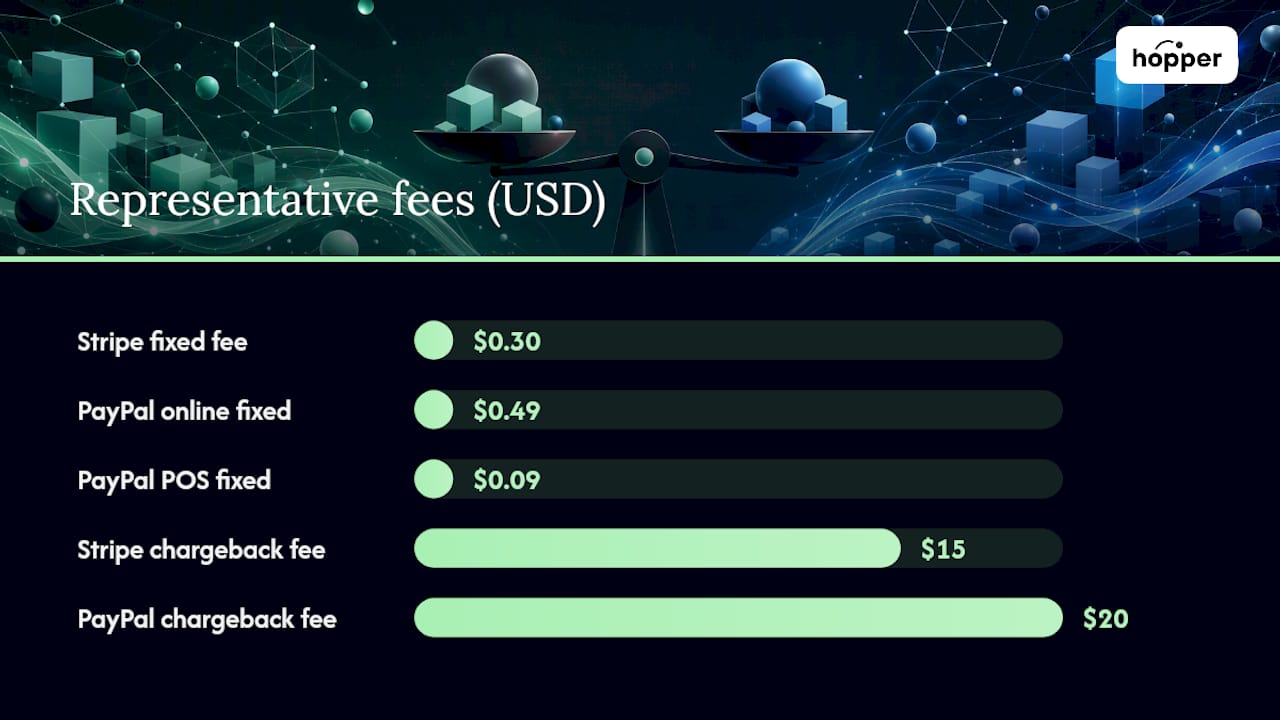
| Dispute/chargeback fee | $15 | $20 |
| Refund policy | Processing fee not returned | Processing fee not returned |
| Payout timing | 2 business days standard (rolling) | Typically 1 to 3 business days |
| Subscription billing | Stripe Billing, separately priced | Recurring Billing tools, separate fees |
| Wallet/POS options | Cards, Apple Pay, Google Pay, Link | PayPal wallet, Venmo, POS/QR at lower card-present rates |
A few things jump out immediately. The $0.19 gap between Stripe's fixed fee and PayPal's fixed fee barely matters on a $500 order, but it eats real margin on a $10 sale. And PayPal's in-person QR and POS rates (as low as 2.29% + $0.09) are actually cheaper than its own online Checkout rate, which surprises a lot of merchants who assume "PayPal" means one fixed price.
- Low-AOV digital sellers feel the fixed-fee gap most.
- International sellers should assume PayPal's currency conversion can run several points higher than Stripe's.
- Retail or pop-up sellers using PayPal's card-present terminal get meaningfully better rates than PayPal's own online checkout.
The rate that applies to your store depends entirely on which PayPal product is wired into your checkout, which is exactly what the next section breaks down.
What Is the Exact Formula Behind Each Provider's Fees?
Every card transaction fee has two parts: a percentage of the sale and a fixed amount per transaction. Stripe's standard formula for US domestic online cards is:
Fee = (Order Total × 2.9%) + $0.30
PayPal runs multiple formulas depending on integration. The one most online stores actually see, PayPal Checkout, is:
If your integration uses PayPal's standard card processing instead of Checkout, the published rate drops to 2.99% + $0.49. This is the single most common source of confusion in any Stripe vs PayPal fees comparison: people quote "PayPal's rate" as if it's one number, when it's really three or four numbers depending on how the checkout was built.
Here's what those formulas produce at common order values:
| Order Value | Stripe Fee | PayPal Checkout Fee | PayPal Standard Card |
|---|---|---|---|
| $10 | About thirty cents plus a small percentage | Around fifty cents plus a higher percentage | Around fifty cents plus a moderate percentage |
| — | Slightly less than two dollars | Slightly over two dollars | Just under two dollars |
| $100 | Just over three dollars | Nearly four dollars | Around three and a half dollars |
| $500 | Almost fifteen dollars | Under twenty dollars | Around fifteen dollars |
- Calculate the percentage cut first: multiply the order total by the decimal rate.
- Add the fixed fee on top: $0.30 for Stripe, $0.49 for either PayPal route.
- Compare the result against your margin per sale, not just the rate itself.
On a $10 sale, the fixed fee makes up more than half of Stripe's total charge. That's the pattern to watch: the fixed fee dominates at low AOV, and the percentage dominates at high AOV. Stripe's $15 dispute fee, covered later, follows the same logic on a different axis.
Pro Tip: Log into your PayPal dashboard and check "Activity" for a recent sale. The fee line item tells you exactly which product processed it, Checkout, standard card, or Advanced, so you're comparing the right number instead of guessing.
How Much Do International Cards and Currency Conversion Add?
International and cross-border sales add a second layer of fees on top of the base rate, and this is where the Stripe vs PayPal fees math shifts the most. Stripe adds 1.5% for cards issued outside the US, plus another 1% if currency conversion is involved. PayPal adds a similar 1.5% international fee, but its currency conversion fee can run up to roughly 4% depending on the currency pair, according to third-party reporting on PayPal's published terms.

Run a $100 sale from a customer paying in euros through a US store. The gap widens fast once conversion enters the picture.
Where merchants get caught off guard:
- The card's issuing country, not the customer's shipping address, determines whether a card counts as "international."
- Displaying prices in the customer's local currency doesn't always avoid conversion fees; it depends on your settlement currency setup.
- Some card networks apply their own cross-border assessment on top of what Stripe or PayPal charges.
- Check what currency your account settles in before assuming you're avoiding conversion fees.
- If you sell heavily to one foreign market, ask whether either processor supports settling directly in that currency.
- Audit a sample of international orders monthly to catch fee creep as your customer base shifts.
Pro Tip: If a large share of your sales come from one country outside the US, price and invoice in that country's currency where possible. It shifts the conversion decision to the customer's bank instead of your payment processor.
Do Refunds and Chargebacks Cost You Extra?
Yes, and this is the part most merchants underestimate until it shows up on a monthly statement. Neither Stripe nor PayPal returns the original processing fee when you issue a refund.
Then there's disputes. Stripe charges a $15 dispute fee per chargeback; PayPal typically charges $20. High-return categories, like apparel or courses with a satisfaction guarantee, feel this compounding effect the hardest.
Ways to keep this cost down:
- Use clear billing descriptors so customers recognize the charge and don't dispute it out of confusion.
- Respond to dispute notifications quickly. Most processors let you contest with proof of delivery or service.
- Track refund rate by product, not just storewide, so you can catch a problem SKU before it drags down your margin.
- Consider a shorter, clearer refund policy if disputes cluster around ambiguous terms.
Pro Tip: Add your average dispute rate as a line item when you model effective cost per transaction. A processor's headline rate means little if disputes are quietly adding another half-point to your real cost.
Are Subscription and Recurring Billing Tools Included?
Neither Stripe nor PayPal bundles full subscription management into their base transaction rate. Stripe's core percentage covers the card transaction itself, but recurring billing logic, like dunning management, proration, and invoicing, lives in Stripe Billing, a separately priced add-on. PayPal's Recurring Billing tools carry their own monthly costs too.
For a merchant running a handful of subscriptions, building the recurring logic yourself with basic API calls can save the add-on fee. For anyone running hundreds of subscribers with failed-payment recovery, proration, and multiple pricing tiers, the automation tends to pay for itself in recovered revenue alone.
The trade-off comes down to this:
- Predictability: bolt-on billing tools give you dunning and retry logic without custom engineering.
- Reporting: built-in tools usually surface churn and MRR metrics automatically.
- Cost: every add-on stacks onto your effective per-transaction rate, so a "cheap" base fee can hide a more expensive total stack.
- Control: custom-built billing logic costs engineering time but avoids ongoing per-subscription fees.
That number usually settles whether the add-on fee is worth paying.
Which Payment Methods and Integration Options Fit Your Store?
Stripe and PayPal solve different problems at checkout, and this affects conversion just as much as it affects fees. Stripe supports cards, Apple Pay, Google Pay, and its own Link wallet through a developer-first API that gives you full control over checkout design. PayPal brings its own wallet, Venmo (in the US), and a recognizable "PayPal" button that a lot of shoppers trust by habit, plus in-person POS and QR acceptance at lower card-present rates than its own online rate.
Integration complexity differs sharply too. Stripe's hosted Checkout gets a basic store live fast, while its full API lets a development team build a fully custom flow with fraud tools layered in. PayPal's Checkout button drops into a site in minutes with almost no code, which is exactly why so many small stores default to it even at a higher headline rate.
Practical calls for small teams:
- Choose hosted checkout (either provider) when speed to launch matters more than custom design.
- Choose Stripe's API when you need a checkout flow that matches your brand exactly or need granular fraud rules.
- Add PayPal wallet alongside a card processor when buyer trust and one-click familiarity are driving cart abandonment.
- Add PayPal POS or QR codes for any in-person sales; the card-present rate beats PayPal's own online rate.
What Do Real Numbers Look Like Across AOVs?
The formulas hold up differently depending on your store's actual order pattern, so here's the same math applied at scale.
- Multiply your monthly order count at each AOV tier by the per-order fee difference.
- Add international orders separately, applying the surcharges from the currency section above.
- Subtract expected dispute costs using your own chargeback rate.
Run two quick scenarios to see how this shifts. A low-AOV digital product store selling $10 items to a US-only audience saves a modest but real amount per order with Stripe, and that gap compounds fast at volume. A mixed international marketplace taking manual card entries and foreign currency, on the other hand, sees the gap widen well beyond the domestic numbers above once PayPal's currency conversion fee is layered on.
Every calculation here rounds to the nearest cent and uses each provider's published standard rate, specifically PayPal Checkout, not the lower standard card or Advanced rate some merchants qualify for.
Pro Tip: Take your last 100 orders, split them by AOV bracket, and run this same formula. Most merchants find their real blended rate sits somewhere between the domestic and international numbers, not cleanly at either end.
Which Processor Should You Choose for Your Business?
The right answer depends less on which processor is "better" and more on what your order profile looks like.
- Low-AOV digital product sellers (courses, ebooks, small digital goods): Stripe's lower fixed fee saves real money at volume, since the $0.30 vs $0.49 gap matters most on small transactions.
- High-AOV B2B sellers: the percentage difference matters more than the fixed fee here, so Stripe's lower headline percentage adds up on invoices in the hundreds or thousands of dollars.
- International marketplaces: model both processors' currency conversion terms carefully before committing, since PayPal's conversion fee can run meaningfully higher on certain currency pairs.
- In-person or pop-up retailers: PayPal's card-present and QR rates are often the cheapest option in this entire comparison, undercutting both its own online rate and Stripe's standard rate.
Plenty of merchants run both. Offering PayPal wallet as a secondary option alongside a primary Stripe integration is common precisely because some shoppers abandon a cart without seeing the PayPal button, even when Stripe's underlying rate is cheaper.
- Add PayPal as a secondary payment option for two to four weeks.
- Track conversion rate, average order value, and refund rate separately for each payment method.
- Compare the extra revenue from improved conversion against the extra fee cost from PayPal's higher rate.
Pro Tip: Don't judge this test on fees alone. If PayPal wallet lifts your checkout conversion rate by even a percentage point, that revenue gain often outweighs the fee gap covered earlier in this article.
Why Checkout Control Usually Beats a Slightly Lower Rate
Most of the merchants Hopper works with are course creators and coaches, not high-volume retailers, so the fee math in this article matters, but it's rarely the deciding factor by itself. What actually decides checkout for these businesses is how much friction stands between "here's my course" and "I paid for it." A wallet button can win that moment. A confusing multi-tool checkout stack loses it every time.
That's the real cost most fee comparisons miss: it's not just the percentage on the transaction, it's the cost of stitching together a checkout tool, a course host, and a billing add-on, each with its own fee schedule and its own login. When you're comparing Stripe fees vs PayPal, also ask what it costs to run either one alongside three other subscriptions. That's a big part of why platform choice matters as much as processor choice.
Hopper Bundles Checkout Into One Flat Fee, Not a Stack of Add-Ons
Every fee breakdown above assumes you're running a standalone Stripe or PayPal integration bolted onto a separate course host, community tool, and billing add-on. Hopper folds the storefront, community, content library, and coaching into one subscription, so you're not paying processor fees on top of five other tool bills.

Compare that to assembling Kajabi or Circle for community plus a separate checkout tool plus a billing add-on, each charging its own cut.
What that looks like in practice for an educator:
- One subscription instead of four, starting at $58 a month on Base.
- No contact caps or per-tier feature gates as your list grows.
- A built-in storefront that replaces a separate checkout tool entirely.
- Free migration support if you're moving off Kajabi, Circle, or a similar stack.
If you're already running the fee math from this article and realizing your real cost isn't just Stripe vs PayPal, it's Stripe plus PayPal plus three other tool subscriptions, see how Hopper's pricing compares and start a trial to check the numbers against your own storefront.
Where to Check Current Pricing and Rules
Rates change, so confirm current numbers directly before committing:
- Stripe's pricing page for the current standard rate and any custom volume pricing.
- PayPal's business fees page to confirm which integration rate applies to your account.
- A PayPal fee calculator to model your own AOV mix against published rates.
Always confirm which PayPal product powers your checkout, and check your account's specific international and conversion terms, since these can vary by account history and region.
Sources
- Pricing & Fees
- PayPal Merchant Fees
- Stripe vs PayPal
- Stripe vs PayPal: Fees, checkout and refund costs for a US small business
FAQ
Is Stripe Cheaper Than PayPal?
PayPal can be cheaper for in-person sales through its POS or QR rates.
Why Use Stripe Instead of PayPal?
Stripe offers a lower published rate for online domestic cards, developer-level checkout control, and a lower dispute fee ($15 versus PayPal's $20). PayPal still wins on wallet recognition and in-person acceptance rates.
Who Pays the 3% PayPal Fee?
The merchant pays it.
Are Stripe Fees Too High?
Larger merchants can often negotiate interchange-plus pricing to lower it further.
Does Hopper Charge Extra Payment Processing Fees?
Recommended
On our list and want off? .